The Screen in the Waiting Room Is Part of the Room
Waiting room screen placement can make useful information easier to see while preserving clear sightlines, quiet conversations and visitors’ choice to look away.

Waiting room screen placement shapes whether visitors can read useful information without feeling obliged to watch. A display is seen from a chair, a doorway, a queue or a passing glance, so its position and the activity around it matter as much as the screen itself.
Treat the display as part of the room, not an isolated rectangle. In a clinic, council office, repair shop or community centre, visitors may have different reasons for waiting and different needs for privacy, quiet and clear directions.
Place the screen where visitors can choose to look
A screen directly opposite every chair may be easy to see, but it can make watching feel expected. A position visible from some seats and less prominent from others gives visitors more control over their attention.
Check the view from the entrance, reception desk and main seating areas. If a message is visible from the doorway, visitors may notice it while arriving; if it is visible only from one side of the room, people elsewhere may miss it. Choose based on who needs the information and what the room is for.
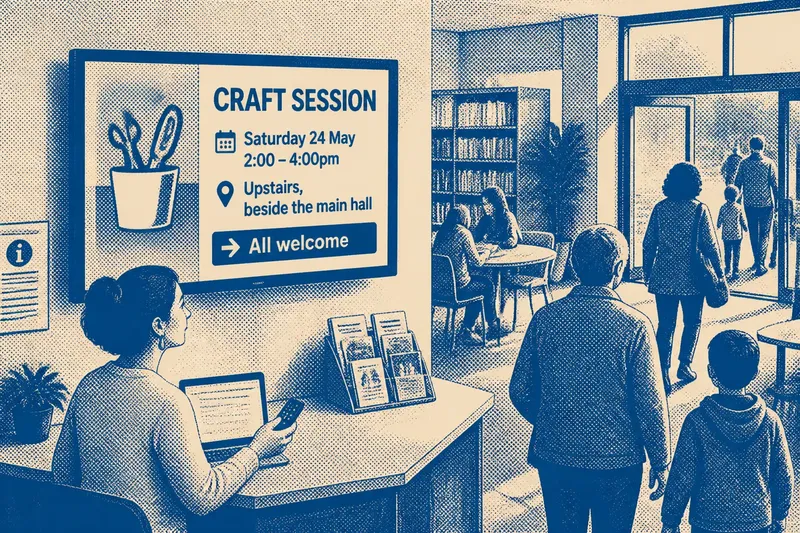
Imagine a small community clinic with chairs facing both a window and a reception desk. Staff place the display where it can be seen from the side seats and entrance, but not directly from every chair. Visitors who want to read a local service notice can turn towards it, while others can look outside or speak with a companion.
Trace sightlines from the places people use
A sightline is the unobstructed view between a person and the display. A tall plant, an open door, a queue or people standing at reception can block it. A screen that looks clear on a floor plan may be hidden during the room’s busiest moments.
Walk the room from seated and standing positions, including the route from the entrance to the desk. Check reflections from windows and overhead lights, and whether visitors using wheelchairs or mobility aids can see the display from available spaces. The aim is to spot avoidable barriers, not to make every view identical.
If the screen has a narrow viewing angle, its orientation matters as much as its height. A slight turn towards the seating may improve legibility without putting the display in the middle of a conversation area.
Keep the display clear of busy activity
Reception conversations, check-in instructions and arriving families all compete for attention. If a screen sits directly above the desk, visitors may struggle to decide whether to watch it or listen to staff. A display near a doorway can also distract from signs that help people find the right place.
Identify the room’s activity zones: where visitors ask questions, the route to the seats and any area where staff need to speak privately. Placing the display outside these zones can make it easier to notice without interrupting essential exchanges. It should not obscure a paper notice or directional sign people rely on.
In a council waiting area, a screen beside the service counter might compete with spoken queue guidance. Moving it to a nearby wall visible from the seats could let it carry general community information while leaving staff instructions easier to hear.
Match the content to the kind of wait
Some visitors pause briefly; others sit long enough to follow a sequence of messages. In a short-stay reception area, useful information should be easy to grasp at a glance. A room where people wait longer can accommodate slower-moving material, provided it remains readable and does not require visitors to catch one particular moment in a loop.
Ask what someone can understand after looking up briefly. A local event notice might need a clear name, place and way to find more information. A long block of text may be difficult to absorb while someone is listening for their name, so keep related details together and avoid making visitors wait through unrelated content to see them again.
A community centre may host quiet appointments at one time and a busy drop-in session later. That changing use is a reason to review the screen’s content and placement, rather than assume every visitor wants the same experience.
Make the screen considerate of people who are not watching
Not every visitor wants moving images or sound. Someone may be reading paperwork, talking with a child, managing discomfort or resting their eyes. A display should not make these ordinary activities harder.
Sound can intrude because everyone in a shared room hears it, even if they cannot choose where to sit. If audio is needed, consider whether captions or a silent version can serve the purpose, and follow the equipment instructions and the organisation’s accessibility guidance. Captions also help people who cannot hear speech clearly.
Movement and brightness need attention too. Rapid transitions can draw the eye away from a conversation, while a bright display may feel harsh in a dim room. Adjust the presentation to suit the surrounding light and activity while keeping information legible.
How can you check whether placement suits the room?
What should I check before mounting a waiting room screen?
Check views from the entrance, seats, reception point and accessible seating, then look for reflections, obstructions and signs the screen could hide. Also consider whether it distracts from conversations or instructions visitors need to hear.
Should a waiting room screen be visible from every seat?
Not necessarily. Broad visibility can help people who want information, but a screen that dominates every seat may make viewing feel compulsory. Leave visitors a comfortable choice about whether to look.
When should captions or audio be considered?
Use captions when spoken content matters, and consider whether sound is necessary in a shared space. Choose settings in line with the equipment instructions and the organisation’s accessibility requirements.
How can staff tell whether the placement is working?
Observe the room during ordinary use without treating anyone’s glance as proof of interest. Notice whether people can read the intended information, staff conversations remain clear, and the display leaves movement and signs unobstructed.
Reassess the screen when the room changes
Furniture, queues and services shift. A chair moved to make space for a pram can alter a sightline; a new leaflet stand can cover part of the screen. Include the display in routine room checks, particularly after a layout change or a change in the information it carries.
Ask staff what visitors commonly request and where they tend to pause, while remembering that a quiet room does not necessarily mean everyone is comfortable. A discreet comment card or an invitation to tell reception if information is hard to see can offer feedback without requiring anyone to engage with the display.
Good waiting room screen placement supports the room’s purpose while leaving attention in the visitor’s hands. Recheck the view from the places people actually occupy, protect the room’s conversations and directions, and keep looking optional.